cortex-mem
Library Listed
🧠 The production-ready cognitive foundation for autonomous systems such as Embodied-AI and OpenClaw. For memory management, from extraction and search to automated optimization, with SKILL, CLI, API, MCP, and insights dashboard out-of-the-box.
- Downloads
- 126
- Dependents
- 6
- Stars
- 318
- Forks
- 25
- Contributors
- 3
- Commits
- 600
- Latest release
- 2.7.0 ·
About

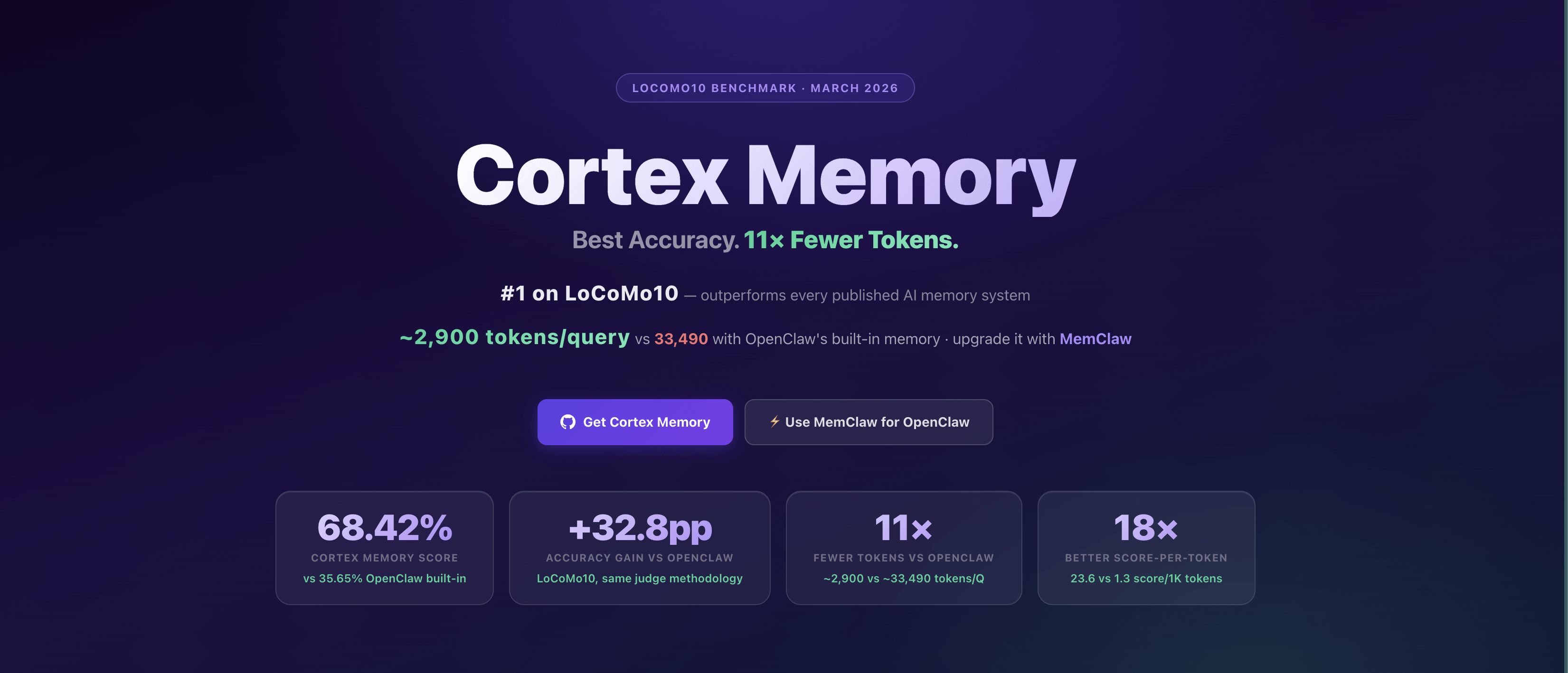
🧠 The AI-native memory framework for building intelligent, context-aware applications 🧠
Built with Rust, Cortex Memory is a high-performance, persistent, and intelligent long-term memory system that gives your AI agents / OpenClaw the ability to remember, learn, and personalize interactions across sessions.
👋 What is Cortex Memory?
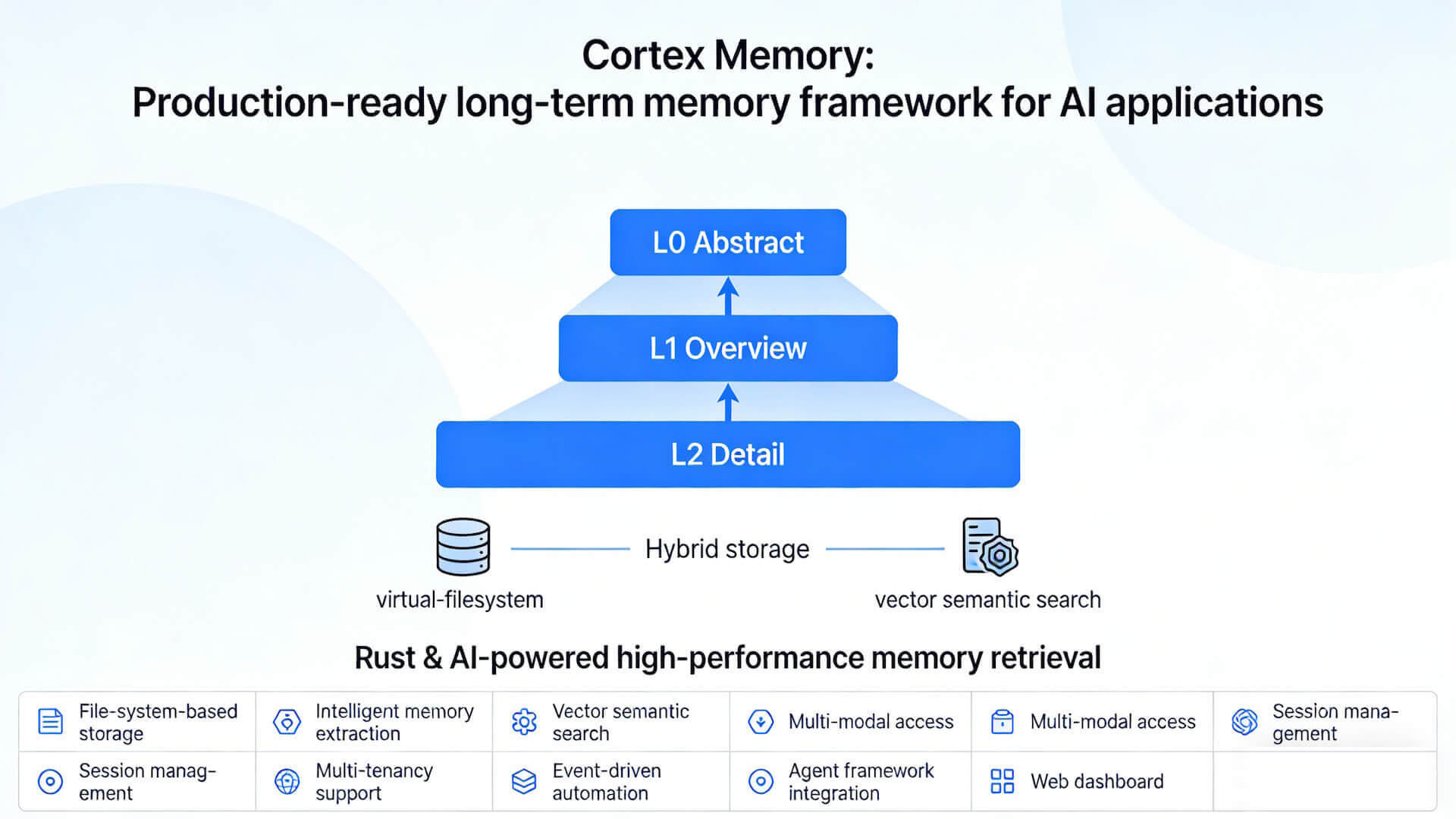
Cortex Memory is a complete, production-ready framework for giving your AI applications a long-term memory. It moves beyond simple chat history, providing an intelligent memory system with a hierarchical three-tier memory architecture (L0 Abstract → L1 Overview → L2 Detail) that automatically extracts, organizes, and optimizes information to make your AI agents smarter and more personalized.
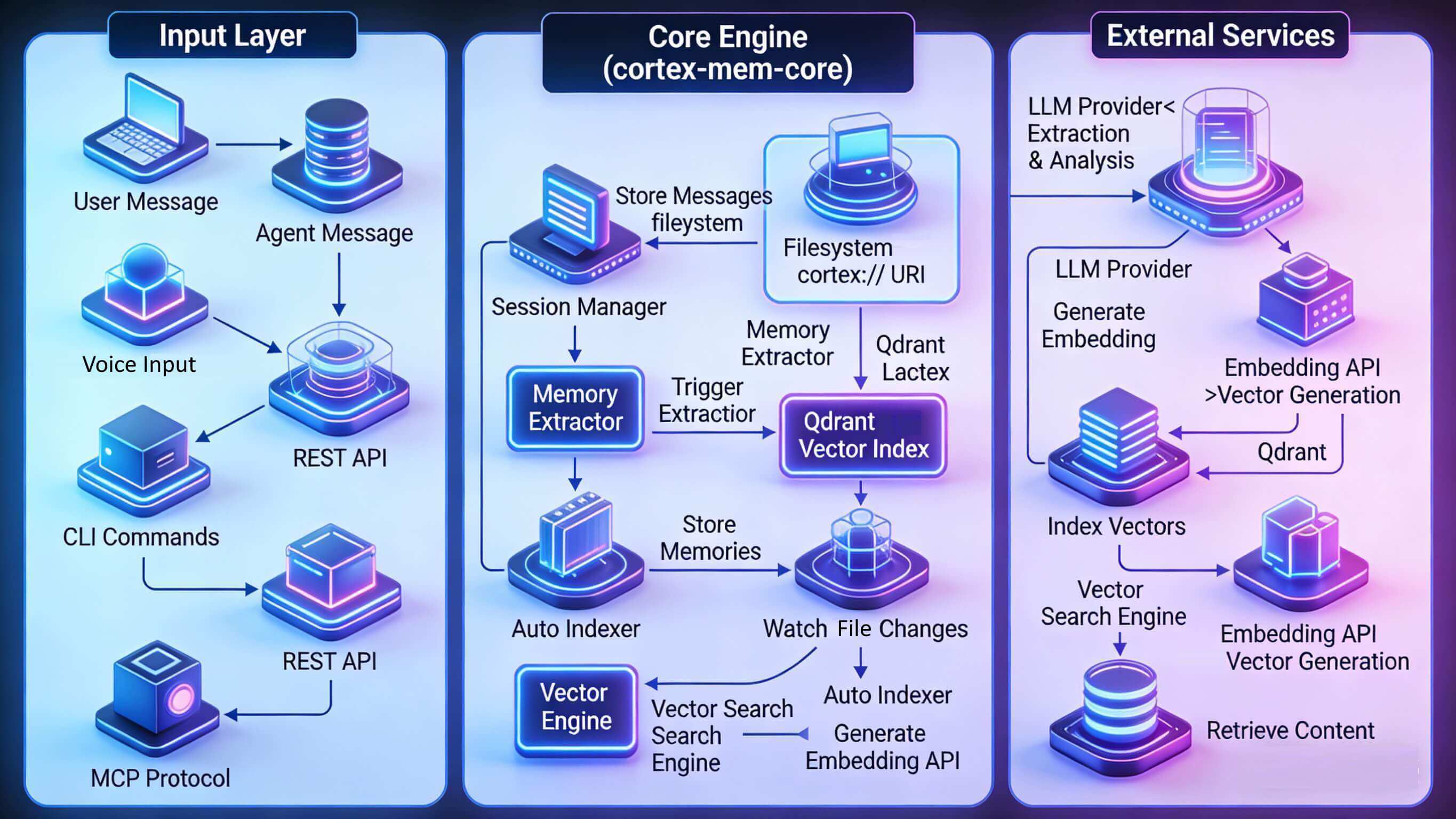
Cortex Memory uses a sophisticated pipeline to process and manage memories, centered around a hybrid storage architecture combining virtual-filesystem durability with vector-based semantic search.
| Blazing Fast Layered Context Loading | Context Organization as Virtual Files | Precision Memory Retrieval |
|---|---|---|
 |  |  |
Cortex Memory organizes data using a virtual filesystem approach with the cortex:// URI scheme:
Read the full README
# Basic Structure
cortex://{dimension}/{path}

# Dimensions
session/    - Session memories (conversation history, timeline)
user/       - User memories (preferences, entities, events)
agent/      - Agent memories (cases, skills)
resources/  - Knowledge base resources

# Examples
cortex://session/{session_id}/timeline/{date}/{time}.md
cortex://user/preferences/{name}.md
cortex://agent/cases/{case_id}.md
cortex://resources/{resource_name}/
😺 Why Use Cortex Memory?
Transform your stateless AI into an intelligent, context-aware partner.
| Before Cortex Memory | After Cortex Memory |
|---|---|
Stateless AI
| Intelligent AI with Cortex Memory
|
🌟 For:
- Developers building LLM-powered chatbots and agents.
- Teams creating personalized AI assistants.
- Open source projects that need a memory backbone.
- Anyone who wants to build truly intelligent AI applications!
❤️ Like Cortex Memory? Star it 🌟 or Sponsor Me! ❤️
🌠 Features & Capabilities
- File-System Based Storage: Memory content stored as markdown files using the
cortex://virtual URI scheme, enabling version control compatibility and portability. - Intelligent Memory Extraction: Automatically extracts structured memories (facts, decisions, entities) from conversations using LLM-powered analysis with confidence scoring.
- Vector-Based Semantic Search: High-performance similarity search via Qdrant with metadata filtering across dimensions (user/agent/session), using weighted scoring.
- Multi-Modal Access: Interact through REST API, CLI, MCP protocol, or direct Rust library integration.
- Three-Tier Memory Hierarchy: Progressive disclosure system (L0 Abstract → L1 Overview → L2 Detail) optimizes LLM context window usage with lazy generation.
- Session Management: Track conversation timelines, participants, and message history with automatic indexing and event-driven processing.
- Multi-Tenancy Support: Isolated memory spaces for different users and agents within a single deployment via tenant-aware collection naming.
- Event-Driven Automation: File watchers and auto-indexers for background processing, synchronization, and profile enrichment.
- LLM Result Caching: Intelligent caching with LRU eviction and TTL expiration reduces redundant LLM API calls by 50-75%, with cascade layer debouncing for 70-90% reduction in layer updates.
- Incremental Memory Updates: Introduced an event-driven incremental update system (
MemoryEventCoordinator,CascadeLayerUpdater) that keeps L0/L1 layers in sync automatically as memories change. - Memory Forgetting Mechanism: Introduced
MemoryCleanupServicebased on the Ebbinghaus forgetting curve — automatically archives or deletes low-strength memories to control storage growth in long-running agents. - Agent Framework Integration: Built-in support for Rig framework and Model Context Protocol (MCP).
- Web Dashboard: Svelte 5 SPA (Insights) for monitoring, tenant management, and semantic search visualization.
🧠 How It Works
Cortex Memory uses a sophisticated pipeline to process and manage memories, centered around a hybrid storage architecture combining virtual-filesystem durability with vector-based semantic search.
flowchart TB
    subgraph Input["Input Layer"]
        User[User Message]
        Agent[Agent Message]
        CLI[CLI Commands]
        API[REST API]
        MCP[MCP Protocol]
    end

    subgraph Core["Core Engine (cortex-mem-core)"]
        Session[Session Manager]
        Extractor[Memory Extractor]
        Indexer[Auto Indexer]
        Search[Vector Search Engine]
    end

    subgraph Storage["Storage Layer"]
        FS[(Filesystem<br/>cortex:// URI)]
        Qdrant[(Qdrant<br/>Vector Index)]
    end

    subgraph External["External Services"]
        LLM[LLM Provider<br/>Extraction & Analysis]
        Embed[Embedding API<br/>Vector Generation]
    end

    User --> Session
    Agent --> Session
    CLI --> Core
    API --> Core
    MCP --> Core

    Session -->|Store Messages| FS
    Session -->|Trigger Extraction| Extractor

    Extractor -->|Analyze Content| LLM
    Extractor -->|Store Memories| FS

    Indexer -->|Watch Changes| FS
    Indexer -->|Generate Embeddings| Embed
    Indexer -->|Index Vectors| Qdrant

    Search -->|Query Embedding| Embed
    Search -->|Vector Search| Qdrant
    Search -->|Retrieve Content| FS
Memory Architecture
Cortex Memory organizes data using a virtual filesystem approach with the cortex:// URI scheme:
cortex://{dimension}/{scope}/{category}/{id}
- Dimension:
user,agent,session, orresources - Scope: Tenant or identifier
- Category:
memories,profiles,entities,sessions, etc. - ID: Unique memory identifier
Three-Tier Memory Hierarchy
Cortex Memory implements a progressive disclosure system with three abstraction layers:
| Layer | Purpose | Token Usage | Use Case |
|---|---|---|---|
| L0 (Abstract) | Fast positioning, coarse-grained candidate selection | ~100 tokens | Initial screening (20% weight) |
| L1 (Overview) | Structured summary with key points and entities | ~500-2000 tokens | Context refinement (30% weight) |
| L2 (Detail) | Full conversation content | Variable | Precise matching (50% weight) |
This tiered approach optimizes LLM context window usage by loading only the necessary detail level. The search engine uses weighted scoring combining all three layers L0/L1/L2.
🌐 The Cortex Memory Ecosystem
Cortex Memory is a modular system composed of several crates, each with a specific purpose. This design provides flexibility and separation of concerns.
graph TD
    subgraph "User Interfaces"
        CLI["cortex-mem-cli<br/>Terminal Interface"]
        Insights["cortex-mem-insights<br/>Web Dashboard"]
    end

    subgraph "APIs & Integrations"
        Service["cortex-mem-service<br/>REST API Server"]
        MCP["cortex-mem-mcp<br/>MCP Server"]
        Rig["cortex-mem-rig<br/>Rig Framework"]
    end

    subgraph "Core Engine"
        Core["cortex-mem-core<br/>Business Logic"]
        Tools["cortex-mem-tools<br/>Agent Tools"]
    end

    subgraph "External Services"
        VectorDB[("Qdrant<br/>Vector Database")]
        LLM[("LLM Provider<br/>OpenAI/Azure/Local")]
    end

    %% Define Dependencies
    Insights -->|REST API| Service

    CLI --> Core
    Service --> Core
    MCP --> Tools
    Rig --> Tools
    Tools --> Core

    Core --> VectorDB
    Core --> LLM
cortex-mem-core: The heart of the system. Contains business logic for filesystem abstraction (cortex://URI), LLM client wrappers, embedding generation, Qdrant integration, session management, layer generation (L0/L1/L2), extraction engine, search engine, automation orchestrator, and incremental update system (MemoryEventCoordinator,CascadeLayerUpdater,LlmResultCache,IncrementalMemoryUpdater) as well as forgetting mechanism (MemoryCleanupService).cortex-mem-service: High-performance REST API server (Axum-based) exposing all memory operations via/api/v2/*endpoints. Runs on port 8085 by default.cortex-mem-cli: Command-line tool (cortex-membinary) for developers and administrators to interact with the memory store directly.cortex-mem-insights: Pure frontend Svelte 5 SPA for monitoring, analytics, and memory management through a web interface.cortex-mem-mcp: Model Context Protocol server for integration with AI assistants (Claude Desktop, Cursor, etc.).cortex-mem-rig: Integration layer with the rig-core agent framework for tool registration.cortex-mem-tools: MCP tool schemas and operation wrappers for agent integration.cortex-mem-config: Configuration management module handling TOML loading, environment variable resolution, and tenant-specific overrides.
🖼️ Observability Dashboard
Cortex Memory includes a powerful web-based dashboard (cortex-mem-insights) that provides real-time monitoring, analytics and management capabilities. The dashboard is a pure frontend Svelte 5 SPA that connects to the cortex-mem-service REST API.
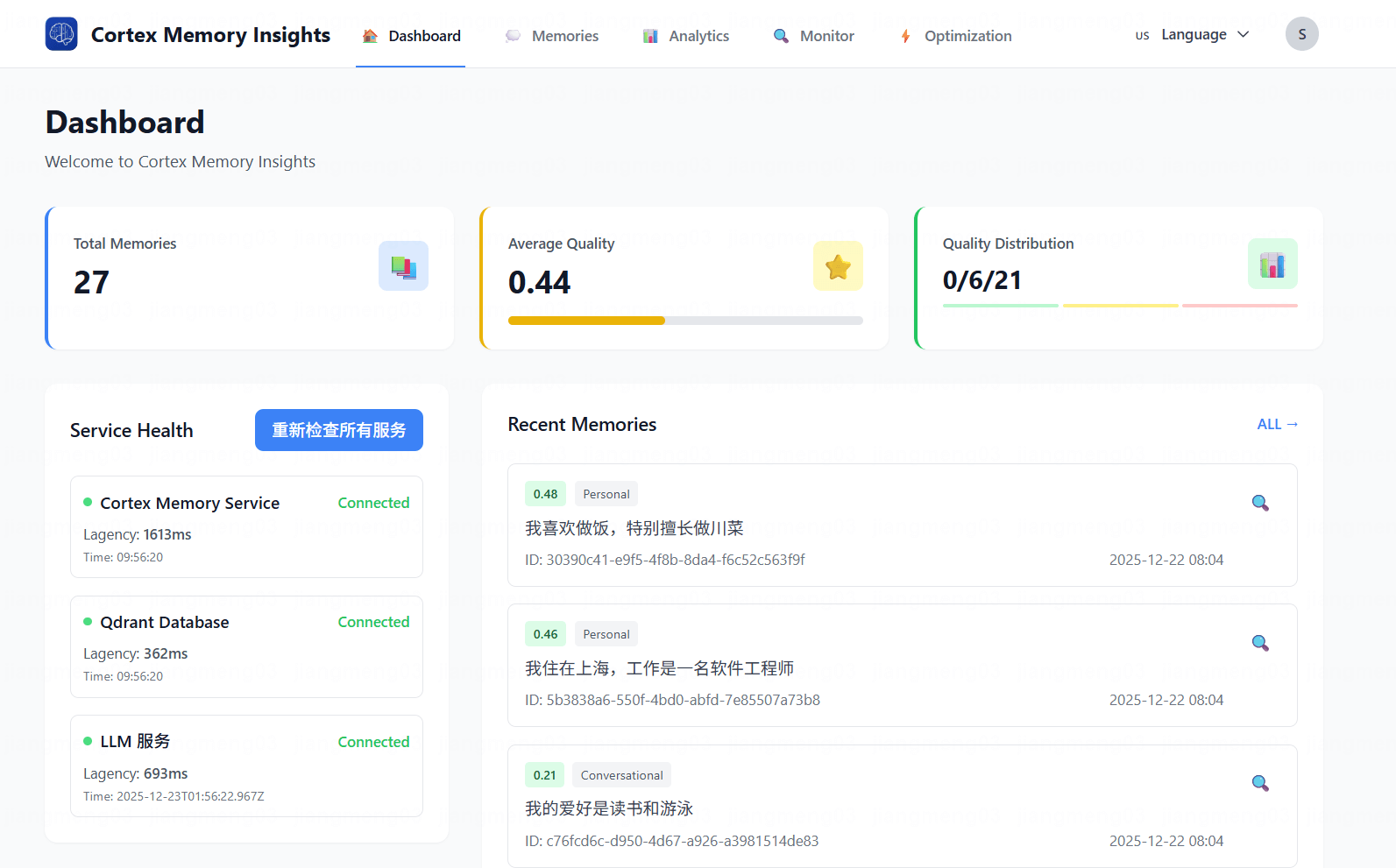
Interactive Dashboard: Tenant overview, system health, and storage statistics at a glance
Key Features
- Tenant Management: View and switch between multiple tenants with isolated memory spaces
- Memory Browser: Navigate the
cortex://filesystem to view and manage memory files - Semantic Search: Perform natural language queries across the memory store
- Health Monitoring: Real-time service status and LLM availability checks
Running the Dashboard
# Start the backend service first
cortex-mem-service --data-dir ./cortex-data --port 8085

# In another terminal, start the insights dashboard
cd cortex-mem-insights
bun install
bun run dev
The dashboard will be available at http://localhost:5173 and will proxy API requests to the backend service.
🦞 Community Showcase: MemClaw
MemClaw is a deeply customized memory enhancement plugin for the OpenClaw ecosystem, powered by the locally-running Cortex Memory engine. It delivers superior memory capabilities compared to OpenClaw's built-in memory system, achieving over 80% token savings while maintaining exceptional memory accuracy, security, and performance.
Why MemClaw?
| OpenClaw Native Memory | MemClaw |
|---|---|
| Basic memory storage | Three-tier L0/L1/L2 architecture for intelligent retrieval |
| Higher token consumption | 80%+ token savings with layered context loading |
| Limited search precision | Vector search + Agentic VFS exploration for complex scenarios |
Key Features
- 🎯 Low Token & Hardware Resource Usage: Rust-powered high-performance memory components with progressive retrieval for optimal context loading
- 🔒 Complete Data Privacy: All memories stored locally with zero cloud dependency
- 🚀 One-Click Migration: Seamlessly migrate from OpenClaw native memory to MemClaw
- ⚙️ Easy Configuration: Zero runtime dependencies, one-line installation, minimal config to get started
Available Tools
| Tool | Purpose |
|---|---|
cortex_search | Semantic search across all memories with tiered retrieval |
cortex_recall | Recall memories with extended context (snippet + full content) |
cortex_add_memory | Store messages for future retrieval |
cortex_close_session | Close session and trigger memory extraction pipeline |
cortex_migrate | One-click migration from OpenClaw native memory |
cortex_maintenance | Periodic maintenance (prune, reindex, layer generation) |
Quick Start
# Install via OpenClaw
openclaw plugins install @memclaw/memclaw
Note: Set
memorySearch.enabled: falseto disable OpenClaw's built-in memory and use MemClaw instead.
Documentation
For current maintenance status and repository details, see the MemClaw project notice.
Source Memory Example: TweetClaw X/Twitter Signals
Cortex Memory can keep reviewed public X/Twitter research from TweetClaw as durable source memory without storing credentials, raw exports, or private account data. This is useful for OpenClaw agents that collect market, support, competitor, or community signals and need to recall why a decision was made later.
See TweetClaw X/Twitter source memory for setup, storage shape, and search examples.
🌟 Community Showcase: Cortex TARS
Meet Cortex TARS — a production-ready AI-native TUI (Terminal User Interface) application that demonstrates the true power of Cortex Memory. Built as a "second brain" companion, Cortex TARS brings auditory presence to your AI experience and can truly hear and remember your voice in the real world, showcases how persistent memory transforms AI interactions from fleeting chats into lasting, intelligent partnerships.
What Makes Cortex TARS Special?
Cortex TARS is more than just a chatbot — it's a comprehensive AI assistant platform that leverages Cortex Memory's advanced capabilities:
🎭 Multi-Agent Management
Create and manage multiple AI personas, each with distinct personalities, system prompts, and specialized knowledge areas. Whether you need a coding assistant, a creative writing partner, or a productivity coach, Cortex TARS lets you run them all simultaneously with complete separation.
💾 Persistent Role Memory
Every agent maintains its own long-term memory, learning from interactions over time. Your coding assistant remembers your coding style and preferences; your writing coach adapts to your voice and goals. No more repeating yourself — each agent grows smarter with every conversation.
🔒 Memory Isolation
Advanced memory architecture ensures complete isolation between agents and users. Each agent's knowledge base is separate, preventing cross-contamination while enabling personalized experiences across different contexts and use cases.
🎤 Real-Time Audio-to-Memory (The Game Changer)
This is where Cortex TARS truly shines. With real-time device audio capture, Cortex TARS can listen to your conversations, meetings, or lectures and automatically convert them into structured, searchable memories. Imagine attending a meeting while Cortex TARS silently captures key insights, decisions, and action items — all stored and ready for instant retrieval later. No more frantic note-taking or forgotten details!
Why Cortex TARS Matters
Cortex TARS isn't just an example — it's a fully functional application that demonstrates:
- Real-world production readiness: Built with Rust, it's fast, reliable, and memory-safe
- Seamless Cortex Memory integration: Shows best practices for leveraging the memory framework
- Practical AI workflows: From multi-agent conversations to audio capture and memory extraction
- User-centric design: Beautiful TUI interface with intuitive controls and rich features
Explore Cortex TARS
Ready to see Cortex Memory in action? Dive into the Cortex TARS project:
cd examples/cortex-mem-tars
cargo build --release
cargo run --release
Check out the Cortex TARS README for detailed setup instructions, configuration guides, and usage examples.
Cortex TARS proves that Cortex Memory isn't just a framework — it's the foundation for building intelligent, memory-aware applications that truly understand and remember.
🏆 Benchmark
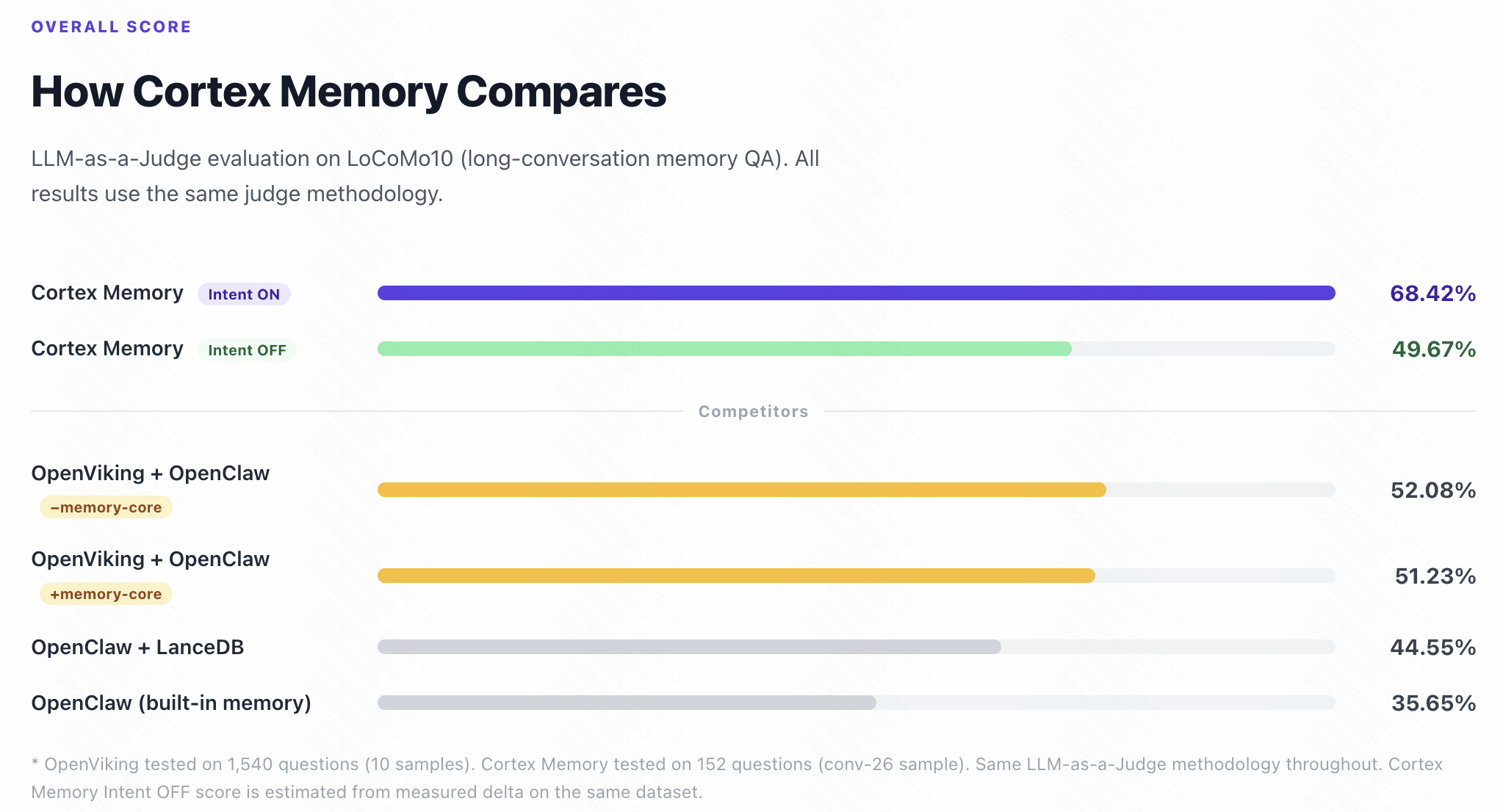
Cortex Memory has been rigorously evaluated on the LoCoMo10 dataset (conv-26, 152 questions, 19 conversation sessions spanning May–October 2023) using LLM-as-a-Judge — the same methodology used by the OpenViking official evaluation. The results demonstrate Cortex Memory's superior performance against all other systems.
Performance Comparison
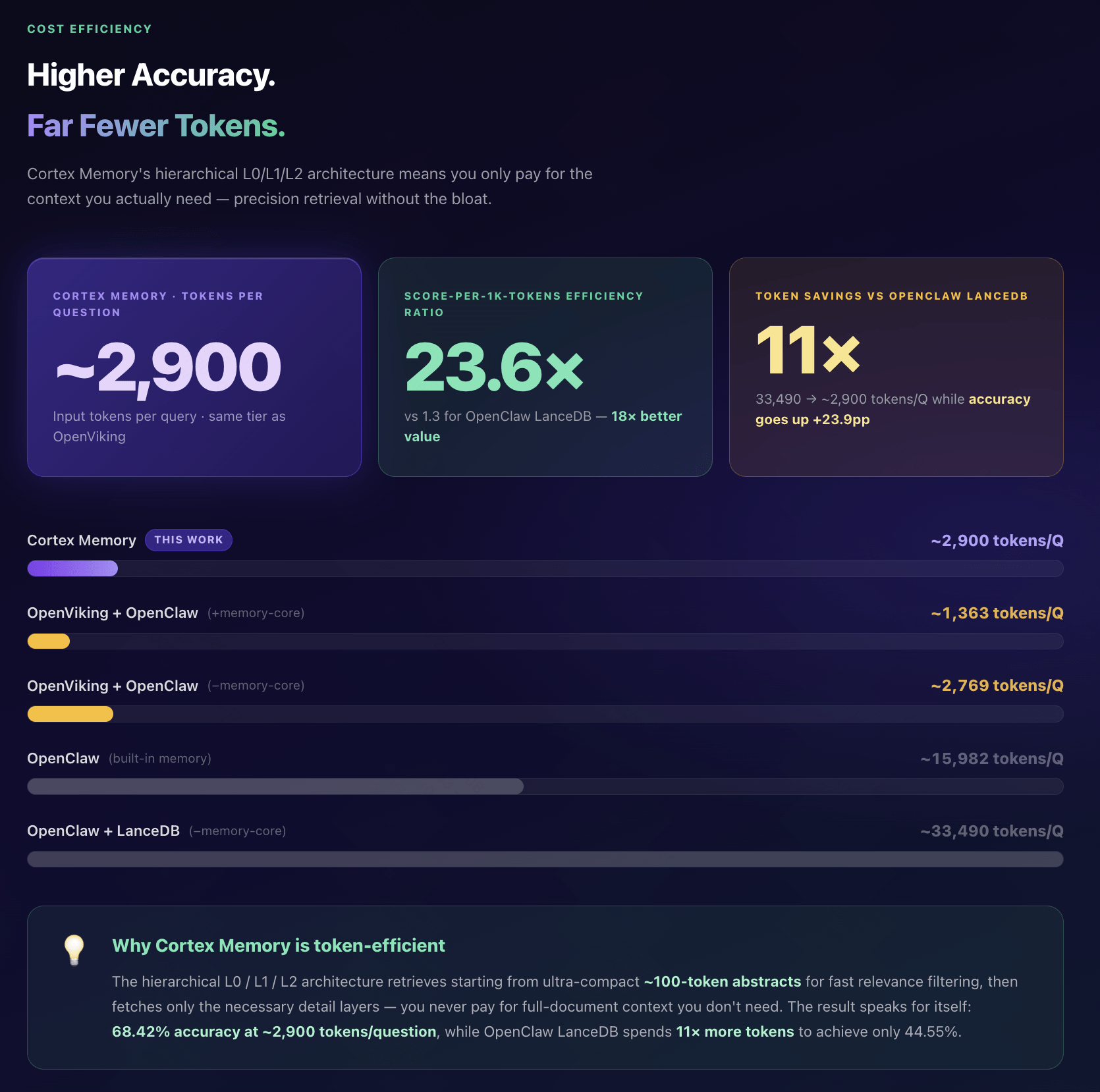
Overall Score: Cortex Memory v5 achieves 68.42% — outperforming all OpenViking and OpenClaw configurations
Overall Scores
| System | Score | Questions |
|---|---|---|
| Cortex Memory v5 (Intent ON) | 68.42% | 152 |
| OpenViking + OpenClaw (−memory-core) | 52.08% | 1,540 |
| OpenViking + OpenClaw (+memory-core) | 51.23% | 1,540 |
| OpenClaw + LanceDB (−memory-core) | 44.55% | 1,540 |
| OpenClaw (built-in memory) | 35.65% | 1,540 |
Category Breakdown (v5)
| Category | Description | Score |
|---|---|---|
| Cat 1 | Factual Recall | 37.50% (12/32) |
| Cat 2 | Temporal Reasoning | 62.16% (23/37) |
| Cat 3 | Commonsense Inference | 76.92% (10/13) |
| Cat 4 | Multi-hop Reasoning | 84.29% (59/70) |
| Total | 68.42% (104/152) |
Token Efficiency
| System | Avg Tokens / Question | Score | Score per 1K Tokens |
|---|---|---|---|
| Cortex Memory v5 | ~2,900 | 68.42% | 23.6 |
| OpenViking + OpenClaw (−memory-core) | ~2,769 | 52.08% | 18.8 |
| OpenViking + OpenClaw (+memory-core) | ~1,363 | 51.23% | 37.6 |
| OpenClaw (built-in memory) | ~15,982 | 35.65% | 2.2 |
| OpenClaw + LanceDB (−memory-core) | ~33,490 | 44.55% | 1.3 |
Cortex Memory achieves 11× fewer tokens than OpenClaw+LanceDB and 18× better score-per-token ratio.
Key Technical Advantages
- Intent-Driven Retrieval: Routing multi-hop queries to entity and relational memory scopes improves Cat 4 accuracy by +18.75pp
- Hierarchical L0/L1/L2 Architecture: Precision retrieval starting from ~100-token abstracts — you only pay for context you actually need
- Rust-based Implementation: High-performance, memory-safe core backed by Qdrant vector database
Evaluation Framework
The benchmark script is located in examples/locomo-evaluation, implementing a two-phase pipeline:
- Ingest — conversation sessions are ingested into Cortex Memory per-sample tenant
- QA — 152 questions answered via semantic retrieval + LLM generation
- Judge — LLM-as-a-Judge scores each answer as CORRECT / WRONG (binary, identical to OpenViking methodology)
For more details on running the evaluation, see the locomo-evaluation README and the full results in examples/locomo-evaluation/BENCHMARK.md.
🖥 Getting Started
Prerequisites
- Rust (version 1.86 or later)
- Qdrant vector database (version 1.7+)
- An OpenAI-compatible LLM API endpoint (for memory extraction and analysis)
- An OpenAI-compatible Embedding API endpoint (for vector search)
Installation
The simplest way to get started is to use the CLI and Service binaries, which can be installed via cargo.
# Install the CLI for command-line management
cargo install --path cortex-mem-cli

# Install the REST API Service for application integration
cargo install --path cortex-mem-service

# Install the MCP server for AI assistant integrations
cargo install --path cortex-mem-mcp
Configuration
Cortex Memory applications (cortex-mem-cli, cortex-mem-service, cortex-mem-mcp) are configured via a config.toml file. The CLI will look for this file in the current directory by default, or you can pass a path using the -c or --config flag.
Here is a sample config.toml with explanations:
# -----------------------------------------------------------------------------
# Qdrant Vector Database Configuration
# -----------------------------------------------------------------------------
[qdrant]
url = "http://localhost:6334"     # URL of your Qdrant instance (gRPC port)
http_url = "http://localhost:6333" # HTTP URL for REST API
collection_name = "cortex-memory"  # Base name for collections (tenant suffix added)
timeout_secs = 5                  # Timeout for Qdrant operations
embedding_dim = 1536              # Embedding dimension (e.g., 1536 for text-embedding-3-small)

# -----------------------------------------------------------------------------
# LLM (Large Language Model) Configuration (for reasoning, extraction)
# -----------------------------------------------------------------------------
[llm]
api_base_url = "https://api.openai.com/v1" # Base URL of your LLM provider
api_key = "${OPENAI_API_KEY}"              # API key (supports env variable)
model_efficient = "gpt-5-mini"            # Model for extraction and classification
model_reasoning = "o1-preview"             # Model for complex reasoning (optional)
temperature = 0.7                          # Sampling temperature for LLM responses
max_tokens = 8192                          # Max tokens for LLM generation
timeout_secs = 60                           # Timeout for LLM requests

# -----------------------------------------------------------------------------
# Embedding Service Configuration
# -----------------------------------------------------------------------------
[embedding]
api_base_url = "https://api.openai.com/v1" # Base URL of your embedding provider
api_key = "${OPENAI_API_KEY}"              # API key (supports env variable)
model_name = "text-embedding-3-small"      # Name of the embedding model to use
batch_size = 32                            # Number of texts to embed in a single batch
timeout_secs = 30                          # Timeout for embedding requests

# -----------------------------------------------------------------------------
# Cortex Data Directory Configuration
# -----------------------------------------------------------------------------
[cortex]
data_dir = "./cortex-data"  # Directory for storing memory files and sessions
🚀 Usage
CLI (cortex-mem-cli)
The CLI provides a powerful interface for direct interaction with the memory system. All commands require a config.toml file, which can be specified with --config <path>. The --tenant flag allows multi-tenant isolation.
Add a Memory
Adds a new message to a session thread, automatically storing it in the memory system.
cortex-mem --config config.toml --tenant acme add --thread thread-123 --role user "The user is interested in Rust programming."
--thread <id>: (Required) The thread/session ID.--role <role>: Message role (user/assistant/system). Default: "user"content: The text content of the message (positional argument).
Search for Memories
Performs a semantic vector search across the memory store with weighted L0/L1/L2 scoring.
cortex-mem --config config.toml --tenant acme search "what are the user's hobbies?" --thread thread-123 --limit 10
query: The natural language query for the search.--thread <id>: Filter memories by thread ID.--limit <n>/-n: Maximum number of results. Default: 10--min-score <score>/-s: Minimum relevance score (0.0-1.0). Default: 0.4--scope <scope>: Search scope: "session", "user", or "agent". Default: "session"
List Memories
Retrieves a list of memories from a specific URI path.
cortex-mem --config config.toml --tenant acme list --uri "cortex://session" --include-abstracts
--uri <path>/-u: URI path to list (e.g., "cortex://session" or "cortex://user/preferences"). Default:cortex://session--include-abstracts: Include L0 abstracts in results.
Get a Specific Memory
Retrieves a specific memory by its URI.
cortex-mem --config config.toml --tenant acme get "cortex://session/thread-123/memory-456.md"
uri: The memory URI.--abstract-only/-a: Show L0 abstract instead of full content.--overview/-o: Show L1 overview instead of full content.
Delete a Memory
Removes a memory from the store by its URI.
cortex-mem --config config.toml --tenant acme delete "cortex://session/thread-123/memory-456.md"
Session Management
Manage conversation sessions.
# List all sessions
cortex-mem --config config.toml --tenant acme session list

# Create a new session
cortex-mem --config config.toml --tenant acme session create thread-456 --title "My Session"

# Close a session (triggers extraction, layer generation, and vector indexing)
cortex-mem --config config.toml --tenant acme session close thread-456
Layers and Stats
Manage layer files and display system statistics.
# Display system statistics
cortex-mem --config config.toml --tenant acme stats

# List available tenants
cortex-mem --config config.toml tenant list

# Show L0/L1 layer file coverage status
cortex-mem --config config.toml --tenant acme layers status

# Generate missing L0/L1 layer files
cortex-mem --config config.toml --tenant acme layers ensure-all

# Regenerate oversized L0 abstract files (> 2K characters)
cortex-mem --config config.toml --tenant acme layers regenerate-oversized
REST API (cortex-mem-service)
The REST API allows you to integrate Cortex Memory into any application, regardless of the programming language. The service runs on port 8085 by default.
Starting the Service
# Start the API server with default settings (port 8085)
cortex-mem-service --config config.toml --host 127.0.0.1 --port 8085

# Enable verbose logging
cortex-mem-service --config config.toml -h 127.0.0.1 -p 8085 --verbose
API Endpoints
Health Check
GET /health: Service liveness checkGET /health/ready: Readiness check (Qdrant, LLM connectivity)
Filesystem Operations
GET /api/v2/filesystem/list?uri=<path>: List directory contents.GET /api/v2/filesystem/read/<path>: Read file content.POST /api/v2/filesystem/write: Write content to a file.GET /api/v2/filesystem/stats?uri=<path>: Get directory statistics.
Session Management
GET /api/v2/sessions: List all sessions.POST /api/v2/sessions: Create a new session.POST /api/v2/sessions/:thread_id/messages: Add a message to a session.POST /api/v2/sessions/:thread_id/close: Close a session and trigger memory extraction.
Semantic Search
POST /api/v2/search: Perform semantic search across memories with weighted L0/L1/L2 scoring.
Automation
POST /api/v2/automation/extract/:thread_id: Trigger memory extraction for a thread.POST /api/v2/automation/index/:thread_id: Trigger vector indexing for a thread.POST /api/v2/automation/index-all: Index all threads.POST /api/v2/automation/sync: Manually trigger synchronization between filesystem and vector store.
Tenant Management
GET /api/v2/tenants/tenants: List all available tenants.POST /api/v2/tenants/tenants/switch: Switch active tenant context.GET /api/v2/tenants/{id}/stats: Get per-tenant storage metrics.
Example: Create a Session and Add Message
# Create a new session
curl -X POST http://localhost:8085/api/v2/sessions \
  -H "Content-Type: application/json" \
  -d '{
    "thread_id": "thread-123",
    "title": "Support Conversation"
  }'

# Add a message to the session
curl -X POST http://localhost:8085/api/v2/sessions/thread-123/messages \
  -H "Content-Type: application/json" \
  -d '{
    "role": "user",
    "content": "I just upgraded to the premium plan."
  }'
Example: Semantic Search
curl -X POST http://localhost:8085/api/v2/search \
  -H "Content-Type: application/json" \
  -H "X-Tenant-ID: acme" \
  -d '{
    "query": "What is the user's current subscription?",
    "thread": "thread-123",
    "scope": "session",
    "limit": 5,
    "min_score": 0.5
  }'
Example: Trigger Memory Extraction
# Extract memories from a session (typically called when session is closed)
curl -X POST http://localhost:8085/api/v2/automation/extract/thread-123 \
  -H "Content-Type: application/json" \
  -d '{ "auto_save": true }'
Model Context Protocol (MCP) Server (cortex-mem-mcp)
Cortex Memory provides an MCP server for integration with AI assistants like Claude Desktop, Cursor, or GitHub Copilot. The MCP server exposes memory tools through the stdio transport.
# Run the MCP server with configuration
cortex-mem-mcp --config config.toml --tenant acme
The MCP server exposes the following tools:
- store_memory: Store new facts or conversation summaries
- query_memory: Search memory with natural language
- list_memories: Enumerate available memories by URI prefix
- get_memory: Retrieve a specific memory by URI
- delete_memory: Remove a memory by URI
Configure your AI assistant to use the MCP server by adding it to your assistant's configuration:
🤝 Contribute
We welcome all forms of contributions! Report bugs or submit feature requests through GitHub Issues.
Development Process
- Fork this project
- Create a feature branch (
git checkout -b feature/amazing-feature) - Commit your changes (
git commit -m 'Add some amazing feature') - Push to the branch (
git push origin feature/amazing-feature) - Create a Pull Request
🪪 License
This project is licensed under the MIT License. See the LICENSE file for details.
Compatibility
- Runs on
- GPU support unknown
What shows it
- no dependency or feature matches a backend row
- Native code
- None found
- No native code found
- Python bindings
- No Python binding crate found
- License
- MIT
Compare with similar projects
Order: strongest tier first, then most downloads, then name, with unmeasured values last. A library counts downloads over 30 days. An app counts binary downloads per release. An app with none counts its crate downloads over 30 days. ML Rust runs this catalogue, so its closest project always gets a row.
| Project | Downloads | Dependents | Stars | Latest release | Runs on (GPU) | Native code | License |
|---|---|---|---|---|---|---|---|
|
🧠 The production-ready cognitive foundation for autonomous systems such as Embodied-AI and OpenClaw. For memory management, from extraction and search to automated optimization, with SKILL, CLI, API, MCP, and insights dashboard out-of-the-box. |
126 downloads over 30 days | 6 | 318 | 2.7.0 | GPU support unknown | No native code found | MIT |
|
rust-mcp-sdk Featured
An asynchronous SDK and framework for building MCP-Servers and MCP-Clients, leveraging the rust-mcp-schema for type safe MCP Schema Objects. |
29,764 downloads over 30 days | 51 | 199 | 2.0.0 | GPU support unknown | No native code found | MIT |
|
adk-rust Listed
Rust Agent Development Kit - Build AI agents in Rust with modular components for models, tools, memory, and more. |
5,419 downloads over 30 days | 25 | 743 | 2.3.0 | CUDA, Metal | Binds native code: alsa-sys (feature desktop-audio), audiopus_sys (feature openai-webrtc), cxx (feature livekit), espeak-rs-sys (feature kokoro), libsqlite3-sys (feature sqlite) and 4 more | Apache-2.0 |
|
The autonomous, self-improving AI agent. Single Rust binary. Every channel. Recommended: the 40MB prebuilt binary for macOS, Linux and Windows: https://github.com/opencrabs/opencrabs/releases |
125 binary downloads per release | Not applicable | 1,027 | 0.5.15 | GPU support unknown | Binds native code: libsqlite3-sys, llama-cpp-sys-2, opusic-sys (feature local-tts), tree-sitter (feature code-graph), alsa-sys (feature local-stt) and 1 more | MIT |
|
Think before doing, prove before saving. Vestige is the local-first cognitive operating system and deterministic safety kernel for autonomous AI agents. |
41 binary downloads per release | Not applicable | 660 | Not measured | Not measured | AGPL-3.0 | |
|
shodh-memory Listed
Persistent cognitive memory for AI agents and robots — Hebbian learning, knowledge graph, spatial recall. Zenoh/ROS2 native. Single binary, runs offline. Python bindings |
1 downloads over 30 days | 0 | 322 | 0.2.0 | GPU support unknown | Binds native code: libmimalloc-sys, librocksdb-sys, lz4-sys, ort-sys, pnet_sys (feature zenoh) | Apache-2.0 |
|
An open protocol that gives AI agents a secure, sandboxed place to run code and use tools — with lean context usage. AXP works alongside MCP |
Not measured | Not applicable | 3 | Not measured | Not measured | Not measured | Apache-2.0 |
Why ListedNo archive, New or Featured rule places it, so it is Listed.
What it lacks for Featured
- It has 0 active dependents and 0 new dependents in 365 days. Featured needs 11 active dependents or 9 new dependents in 365 days. The repository route reads 318 stars, 25 forks and 3 contributors. It needs 4,539 stars, 434 forks and 79 contributors together.
What else the check found
- The last activity is on 22 Jul 2026, 110 days ago. The rules expect an update within 365 days. Dormancy rule
Check notes
- the latest release was packaged from a dirty working tree
Exact rules: Listed, Featured library. The check on applied thresholds version 9.
Every rule outcome, as the check records it
expected-interval: version 2.7.0 base 200, raised to the 365-day floor: E = 365 daysdormancy: last activity 2026-07-22, 110 days ago, E = 365: activefeatured: not featured: active_users 0 < 11 and new_adopters 0 < 9 and repository route stars 318 (needs 4539), forks 25 (needs 434), contributors 3 (needs 79)listed: listed: no archive, new or featured rule applies
Measurements and sources
Each signal row shows the raw value, its source and the fetch date. The Sources list gathers every distinct source on this page. Movement needs more history.
Sources6 sources
- Description: the GitHub repository description
- crates.io database dump, fetched
- RustSec advisory database, fetched
- GitHub repository, fetched
- crates.io package, fetched
- GitHub contributors, fetched
Adoption0 active dependents, 0 new dependents in 365 days1 not measured
| Signal | Value | Source | Fetched | Counts |
|---|---|---|---|---|
| Active dependents | 0 | crates.io database dump | Yes | |
| New dependents (365 days) | 0 | crates.io database dump | Yes | |
| Peak active dependents | 0 | crates.io database dump | Yes | |
| Active dependents as a share of the peak | 1 | crates.io database dump | Yes | |
| Binary downloads per release | Not measured | Yes |
MaintenanceLatest human commit: 3 months ago3 not measured
| Signal | Value | Source | Fetched | Counts |
|---|---|---|---|---|
| Latest human commit | 2026-07-22 | GitHub repository | Yes | |
| Latest release | 2026-04-05 | crates.io database dump | Yes | |
| First release | 2025-12-31 | crates.io database dump | Yes | |
| Latest version | 2.7.0 | crates.io database dump | Yes | |
| Days the oldest outside issue waits for a reply | 216 | GitHub repository | Yes | |
| Maintainer replies over 365 days | 3 | GitHub repository | Yes | |
| Repository archived | false | GitHub repository | Yes | |
| Repository gone | false | GitHub repository | Yes | |
| Release commit or manifest in the repo | true | crates.io package | Yes | |
| Published docs | true | crates.io database dump | Yes | |
| Latest release fails cargo check | Not measured | Yes | ||
| Build check date | Not measured | Yes | ||
| Build check toolchain | Not measured | Yes |
SecurityUnpatched vulnerabilities: none
| Signal | Value | Source | Fetched | Counts |
|---|---|---|---|---|
| Unpatched vulnerabilities past the grace window | none | RustSec advisory database | Yes | |
| RustSec unmaintained advisory | none | RustSec advisory database | Yes | |
| Deprecation notice | none | crates.io database dump | Yes | |
| Deprecated requirement | none | crates.io database dump | Yes |
Distribution4 releases, 126 downloads over 30 days5 not measured
| Signal | Value | Source | Fetched | Counts |
|---|---|---|---|---|
| Releases | 4 | crates.io database dump | Yes | |
| Downloads over 30 days | 126 | crates.io database dump | Yes | |
| Binary downloads over the last 3 releases | Not measured | Yes | ||
| Homebrew installs on request over 365 days | Not measured | Yes | ||
| Repology repository families | Not measured | Yes | ||
| Docker pull growth over 90 days | Not measured | Yes | ||
| Docker pulls at the growth baseline | Not measured | Yes | ||
| Every version a prerelease | false | crates.io database dump | Yes | |
| Every version 0.0.x | false | crates.io database dump | Yes | |
| Every version yanked | false | crates.io database dump | Yes | |
| Crate deleted from crates.io | false | crates.io database dump | Yes |
Repository318 stars, 25 forks, 3 contributors, 600 commits. Stars alone never qualify a project.
| Signal | Value | Source | Fetched | Counts |
|---|---|---|---|---|
| GitHub stars | 318 | GitHub repository | Yes — one part of the repository route | |
| GitHub forks | 25 | GitHub repository | Yes — one part of the repository route | |
| Contributors with a GitHub account | 3 | GitHub contributors | Yes — one part of the repository route | |
| Commits on the default branch | 600 | GitHub repository | No | |
| Repository's main crate left out of the entry | none | crates.io database dump | Yes |
Facts that never count
| Signal | Value | Source | Fetched | Counts |
|---|---|---|---|---|
| License | MIT | crates.io database dump | No | |
| Runs on, from listed crates and their direct dependencies | GPU support unknown | crates.io database dump | No | |
| What shows each backend | no dependency or feature matches a backend row | crates.io database dump | No | |
| Native code, from listed crates and their dependencies | No native code found | crates.io database dump | No | |
| Python bindings, from direct dependencies of listed crates | No Python binding crate found | crates.io database dump | No | |
| Crates that depend on a listed crate directly | 6 | crates.io database dump | No |
Corrections and review history
No correction applies to this entry.
Judgments
A judgment enters only through an approved issue and a merged pull request.
No judgment applies to this entry.