kmeans_colors
Library Listed Dormant
Simple k-means clustering to find dominant colors in images. Backed by a generic k-means implementation offered as a standalone library.
- Downloads
- 17,429
- Dependents
- 13
- Stars
- 174
- Forks
- 12
- Contributors
- 4
- Commits
- 105
- Latest release
- 0.7.1 ·
About
Calculate the k average colors in an image using k-means clustering with
k-means++ initialization.
kmeans-colors wraps around a generic k-means library that supports
Lloyd's and Hamerly's algorithms for arbitrary data types. k-means can find the
dominant colors or color palette of an image. Other applications in this crate
are binarization and "color style" transfer.
To use as a library, add the following to your Cargo.toml; add the
palette_color feature to enable palette color types. Executable builds can
be found at https://github.com/okaneco/kmeans-colors/releases.
[dependencies.kmeans_colors]
version = "0.6"
default-features = false
1) Basic usage
k-means clustering works by starting with an initial random guess of the k
number of colors in the image called centroids. For each step, every pixel in
the image is traversed to find what centroid is closest to it in color. Then,
the centroids calculate the average of all the colors close to them and move to
that color. This process repeats until the centroids stop moving or the maximum
step count is reached.
kmeans_colors -i gfx/pink.jpg -k 2 -o pink2
Read the full README
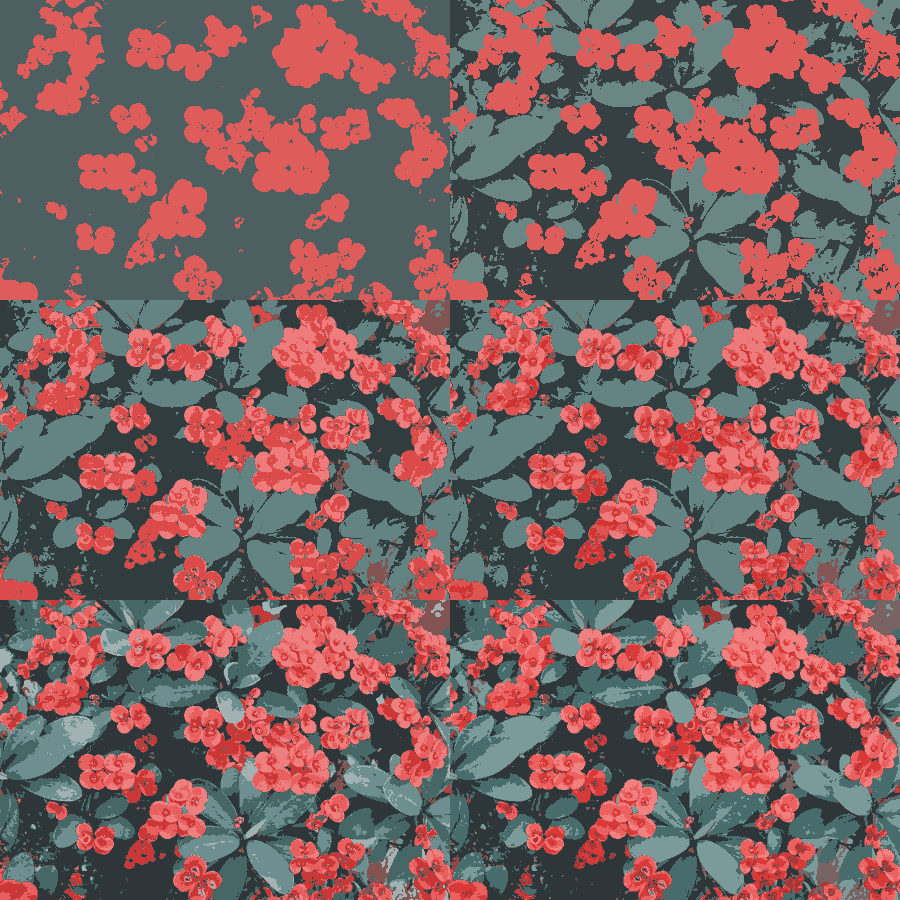
The animation above is a composite of k=2 to k=9 k-means with the preceding
command. -k is the number of colors to find in the image. -r is the amount
of runs to perform, -o specifies the output. By default, the images will save
as .png files. The -o option is not required.
2) Color palettes
kmeans_colors -i gfx/mountains.jpg --no-file --palette

kmeans_colors -i gfx/pink.jpg --no-file --palette --proportional

kmeans_colors -i gfx/flowers.jpg --no-file --palette --proportional --sort

By default, palettes will be composed of equally sized swatches. Passing
--proportional will scale the swatches proportionally to their presence in the
image. The default sorting method is from darkest to lightest, passing --sort
will rearrange the palette in order from most frequent to least frequent color.
The --height and --width of the palette can be specified as well as output
name with --op. Passing -k 1 will produce the average color of the image.
--no-file is passed to bypass saving the result of the original image.
3) The find subcommand
a) Binary Ferris Example
We can use k-means to clean up this doodle and extract the line work from it. The paper this is on is folded and scribbled over with highlighter and blue pencil, the back of the sheet also has ink on it.
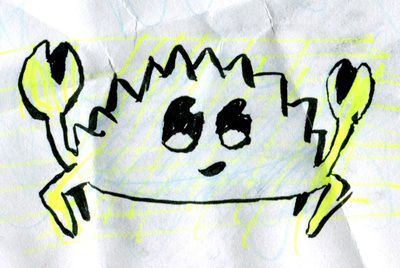
kmeans_colors -i gfx/ferris.jpg -k 2 -o gfx/ferris-2color.png
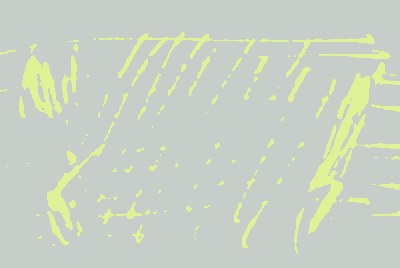
The first attempt uses 2 colors, unfortunately this only picks up the color of the highlighter and the average of the ink and paper.
kmeans_colors -i gfx/ferris.jpg -k 3 -o gfx/ferris-3color.png

Next, we try with k=3. This is a lot better and shows us that we can separate marker colors from ink too. But it's still not what we want.
kmeans_colors find -c 000000,ffffff -i gfx/ferris.jpg -o gfx/ferris-find.png

The solution to effective black and white separation is using the find
subcommand with the -c option, which allows us to specify the colors black
(#000000) and white (#ffffff). The k-means algorithm will only need one
iteration to find the nearest colors in the image to the colors passed with
-c.
b) The --replace flag
With --replace, we run the k-means calculation on an image and replace the
centroids with our own custom colors. The colors we input will replace the
centroids in order from darkest to lightest, and the number of colors we use
will be the amount of k-means centroids we calculate; if we specify 4 colors, we
would be replacing the color groups we'd calculate using -k 4 as in Example 1.


We can transfer the average colors of the left image to the lanterns on the right. Running the following command prints the 12 colors below in order from darkest to lightest in hexadecimal.
kmeans_colors -i gfx/flowers.jpg -p -k 12 --no-file
492f38,6c363e,8d444e,ae525b,8c6779,677a9b,b87078,4b95bb,a499b0,d7969d,e3b8c0,c5c6da
Then, we can use those colors with the -c option on the right image.
kmeans_colors find -i gfx/lanterns.jpg -c 492f38,6c363e,8d444e,ae525b,8c6779,677a9b,
b87078,4b95bb,a499b0,d7969d,e3b8c0,c5c6da --replace

The top half of the image is the previous command which runs in Lab mode by
default. The bottom half of the image was the previous command passed with the
addition of the --rgb flag.
Passing the same colors without --replace results in the image below, which
colors the pixels with the closest color found in the list we supplied.
kmeans_colors find -i gfx/lanterns.jpg -c 492f38,6c363e,8d444e,ae525b,8c6779,677a9b,
b87078,4b95bb,a499b0,d7969d,e3b8c0,c5c6da

Returning to the Ferris example, we can recolor the image using --replace.
kmeans_colors find -i gfx/ferris-find.png -c de4a18,bee0fa --replace -o gfx/ferris-replace.png

-r and -m can be used with the find --replace subcommand and flag
combination. They don't do anything with find by itself, since only one
iteration is needed to produce the result.
4) Print, Percentage, & Verbose
kmeans_colors -i gfx/pink.jpg -k 2 -pv --pct --no-file
The results of the iterations can be printed with the -v verbose flag. The
score gets smaller as the colors converge. This can be helpful for
troubleshooting if results are unexpected since the k-means may not have
converged. The -p flag prints the colors in hexadecimal ordered from darkest
to brightest as seen below. The --pct flag prints the percentage of each color
present in the resulting image.
gfx/pink.jpg
Score: 62.90416
Score: 0.05048233
Iterations: 1
4e5f60,dc5d5c
0.6605,0.3395
Usage Notes:
k-means can get stuck in local minima which prevent it from finding the best
result. To combat this, the amount of runs can be specified with -r to repeat
the process and keep the best result. The -m flag can be used to specify the
max amount of iterations to perform. Lastly, the convergence factor can be
specified with -f. Larger image files will take longer to complete so
defaults were carefully selected for each of these.
The --transparent flag can be passed when working with transparent PNG images.
The k-means will be calculated without factoring in any pixels with
transparency. Otherwise, transparent pixels become matte and negatively impact
the results.
Features
- create a color palette from an image
- Lab space or RGB space calculations
- find the nearest colors to input colors
- replace the colors with custom colors
- adjustable iteration count and repetition
- print the average colors
- print the percentage of each color in the image
- transparency support
- kmeans++ center initialization
- supports multiple images as input to batch process
- specify random seed for reproducible results
Troubleshooting
If you get an invalid color error or hex color length error with the command line tool, try enclosing the color string in quotes.
For example, instead of -c 000000,ffffff use -c '000000,ffffff'.
License
This crate is licensed under either
- the MIT License, or
- the Apache License (Version 2.0)
at your option.
Compatibility
- Runs on
- GPU support unknown
What shows it
- no dependency or feature matches a backend row
- Native code
- None found
- No native code found
- Python bindings
- No Python binding crate found
- License
- Apache-2.0 OR MIT
Compare with similar projects
Order: strongest tier first, then most downloads, then name, with unmeasured values last. A library counts downloads over 30 days. An app counts binary downloads per release. An app with none counts its crate downloads over 30 days. ML Rust runs this catalogue, so its closest project always gets a row.
| Project | Downloads | Dependents | Stars | Latest release | Runs on (GPU) | Native code | License |
|---|---|---|---|---|---|---|---|
|
Simple k-means clustering to find dominant colors in images. Backed by a generic k-means implementation offered as a standalone library. |
17,429 downloads over 30 days | 13 | 174 | 0.7.1 | GPU support unknown | No native code found | Apache-2.0 OR MIT |
|
hdbscan Listed
HDBSCAN clustering in pure Rust. A huge improvement on DBSCAN, capable of identifying clusters of varying densities. |
151,876 downloads over 30 days | 4 | 41 | 0.12.0 | GPU support unknown | No native code found | Apache-2.0 OR MIT |
|
Agglomerative hierarchical clustering. |
71,625 downloads over 30 days | 16 | 106 | 0.3.0 | GPU support unknown | No native code found | MIT |
|
petal-clustering Listed
A collection of clustering algorithms. |
11,542 downloads over 30 days | 3 | 46 | 0.14.0 | GPU support unknown | No native code found | Apache-2.0 |
|
anofox-regression Listed
A robust statistics library for regression analysis |
8,310 downloads over 30 days | 6 | 8 | 0.12.2 | GPU support unknown | No native code found | MIT |
|
treeboost Listed
Gradient-boosted decision trees for tabular data: trains a baseline model in one call, with full control over boosting modes and configs, and Scalar, AVX-512, SVE2, WGPU and CUDA backends. Python bindings |
18 downloads over 30 days | 0 | 9 | 0.1.2 | CUDA, WebGPU | No native code found | Apache-2.0 |
|
A Rust🦀 implementation of CRAFTML, an Efficient Clustering-based Random Forest for Extreme Multi-label Learning |
Not measured | Not applicable | 15 | Not measured | Not measured | Not measured | MIT |
Why ListedNo archive, New or Featured rule places it, so it is Listed.
What it lacks for Featured
- It has 8 active dependents and 5 new dependents in 365 days. Featured needs 11 active dependents or 9 new dependents in 365 days. The repository route reads 174 stars, 12 forks and 4 contributors. It needs 4,539 stars, 434 forks and 79 contributors together.
- The project is dormant and not finished. Dormancy rule
What else the check found
- The last activity is on 8 Sep 2025, 427 days ago. That reaches the 365 days the rules expect, so the project is dormant. Dormancy rule
- The oldest outside issue waits 871 days for a reply, past the limit of 270. No maintainer replied in 365 days. Rot signals rule
- The latest release requires the deprecated dependency structopt. RUSTSEC-2022-0104 Rot signals rule
- The project is dormant with 2 rot signals, which reaches the limit of 2. This is dead check 1 of 2, so the entry is not yet archived. Dead rule
Not measured: Latest release fails cargo check.
Exact rules: Listed, Featured library. The check on applied thresholds version 9.
Every rule outcome, as the check records it
expected-interval: version 0.7.1 base 300, raised to the 365-day floor: E = 365 daysdormancy: last activity 2025-09-08, 427 days ago, E = 365: dormantrot: oldest unanswered issue 871 days (limit 270), no maintainer reply in 365 daysrot: deprecated requirement `structopt (RUSTSEC-2022-0104, https://rustsec.org/advisories/RUSTSEC-2022-0104.html)`dead: dormant with 2 rot signals (limit 2): dead on check 1 of 2, not yet archivedfeatured: not featured: active_users 8 < 11 and new_adopters 5 < 9 and repository route stars 174 (needs 4539), forks 12 (needs 434), contributors 4 (needs 79); dormant and not stablelisted: listed: no archive, new or featured rule applies
Measurements and sources
Each signal row shows the raw value, its source and the fetch date. The Sources list gathers every distinct source on this page. Movement needs more history.
Sources6 sources
- Description: the crates.io description
- crates.io database dump, fetched
- RustSec advisory database, fetched
- GitHub repository, fetched
- crates.io package, fetched
- GitHub contributors, fetched
Adoption8 active dependents, 5 new dependents in 365 days1 not measured
| Signal | Value | Source | Fetched | Counts |
|---|---|---|---|---|
| Active dependents | 8 | crates.io database dump | Yes | |
| New dependents (365 days) | 5 | crates.io database dump | Yes | |
| Peak active dependents | 8 | crates.io database dump | Yes | |
| Active dependents as a share of the peak | 1 | crates.io database dump | Yes | |
| Binary downloads per release | Not measured | Yes |
MaintenanceLatest human commit: 14 months ago3 not measured
| Signal | Value | Source | Fetched | Counts |
|---|---|---|---|---|
| Latest human commit | 2025-09-08 | GitHub repository | Yes | |
| Latest release | 2025-09-08 | crates.io database dump | Yes | |
| First release | 2020-05-07 | crates.io database dump | Yes | |
| Latest version | 0.7.1 | crates.io database dump | Yes | |
| Days the oldest outside issue waits for a reply | 871 | GitHub repository | Yes | |
| Maintainer replies over 365 days | 0 | GitHub repository | Yes | |
| Repository archived | false | GitHub repository | Yes | |
| Repository gone | false | GitHub repository | Yes | |
| Release commit or manifest in the repo | true | crates.io package | Yes | |
| Published docs | true | crates.io database dump | Yes | |
| Latest release fails cargo check | Not measured | Yes | ||
| Build check date | Not measured | Yes | ||
| Build check toolchain | Not measured | Yes |
SecurityUnpatched vulnerabilities: none
| Signal | Value | Source | Fetched | Counts |
|---|---|---|---|---|
| Unpatched vulnerabilities past the grace window | none | RustSec advisory database | Yes | |
| RustSec unmaintained advisory | none | RustSec advisory database | Yes | |
| Deprecation notice | none | crates.io database dump | Yes | |
| Deprecated requirement | structopt (RUSTSEC-2022-0104, https://rustsec.org/advisories/RUSTSEC-2022-0104.html) | crates.io database dump | Yes |
Distribution12 releases, 17,429 downloads over 30 days5 not measured
| Signal | Value | Source | Fetched | Counts |
|---|---|---|---|---|
| Releases | 12 | crates.io database dump | Yes | |
| Downloads over 30 days | 17429 | crates.io database dump | Yes | |
| Binary downloads over the last 3 releases | Not measured | Yes | ||
| Homebrew installs on request over 365 days | Not measured | Yes | ||
| Repology repository families | Not measured | Yes | ||
| Docker pull growth over 90 days | Not measured | Yes | ||
| Docker pulls at the growth baseline | Not measured | Yes | ||
| Every version a prerelease | false | crates.io database dump | Yes | |
| Every version 0.0.x | false | crates.io database dump | Yes | |
| Every version yanked | false | crates.io database dump | Yes | |
| Crate deleted from crates.io | false | crates.io database dump | Yes |
Repository174 stars, 12 forks, 4 contributors, 105 commits. Stars alone never qualify a project.
| Signal | Value | Source | Fetched | Counts |
|---|---|---|---|---|
| GitHub stars | 174 | GitHub repository | Yes — one part of the repository route | |
| GitHub forks | 12 | GitHub repository | Yes — one part of the repository route | |
| Contributors with a GitHub account | 4 | GitHub contributors | Yes — one part of the repository route | |
| Commits on the default branch | 105 | GitHub repository | No | |
| Repository's main crate left out of the entry | none | crates.io database dump | Yes |
Facts that never count
| Signal | Value | Source | Fetched | Counts |
|---|---|---|---|---|
| License | Apache-2.0 OR MIT | crates.io database dump | No | |
| Runs on, from listed crates and their direct dependencies | GPU support unknown | crates.io database dump | No | |
| What shows each backend | no dependency or feature matches a backend row | crates.io database dump | No | |
| Native code, from listed crates and their dependencies | No native code found | crates.io database dump | No | |
| Python bindings, from direct dependencies of listed crates | No Python binding crate found | crates.io database dump | No | |
| Crates that depend on a listed crate directly | 13 | crates.io database dump | No |
Corrections and review history
No correction applies to this entry.
Judgments
A judgment enters only through an approved issue and a merged pull request.
No judgment applies to this entry.